Friday, March 4, 2016

Document sharing features now integrated on Whatsapp

As know, whatsapp messenger is the best instant messaging platform with billions of active users across different platforms. This messenger was released January 2010 and within few years it has achieved lots more than any other social messaging application you can ever think of.


Recently, whatsapp messenger integrated the document sharing features and this feature is made available on whatsapp for android & iOS devices. However, document sharing of different format can be easily shared via whatsapp messenger.
 
 If you’re very observant, you would notice that your whatsapp messenger comes with only photos, videos and audio file sharing features, but no option to share documents. Once you’ve updated to the most recent whatsapp version, the document sharing features would be featured along with the most recent version. So in other words, you’re advised to update the whatsapp messenger for android & iOS to the most recent version in other to get started with the document sharing features.


We also came across some newly integrated features like sharing Photos/videos from cloud services like dropbox, Google drive and onedrive. Other features includes option to select background chat color, the android version brings about 100 new emojis, 5 new language support and many more. You can also backup your chats and media with Google drive backup and this feature is very compatible with Android 6.0 marshmallow devices.


If you’re still using a blackberry device, I advise you swap to either android or iOS smartphones as whatsapp would no longer support blackberry devices coming 2017. Don’t forget to share this update and stay tuned for our future updates.

Tuesday, January 19, 2016

How to Use WhatsApp as Search Engine
WhatsApp is one of the largest messaging app available and I guess majority of us don't even remember when last you sent SMS to someone because WhatsApp is always their for you. Their are some amazing things you can do with WhatsApp aside of chatting and laughing your ass out.

Do you know that, you can use WhatsApp as mini search engine to search anything out within WhatsApp platform? Yea! You can in easy steps.

A group from India created a WhatsApp bot which allows its users to access certain services ordinarily accessible on the internet only and not through WhatsApp. You can search anything and it will reply you instantly.

Football lovers are really going to love this because it gives you live update of football matches.


This is how it works

==>First of all add Whatsapp bot called wikibot to your contact list
==>Create a new whatsapp group and add wikibot to the group +918148911230
==>Open the newly created group and simply message hi and you'll get your reply.


To search for something, just type wiki and the name of what you want to search for. E.g wiki nicki minaj.


That's how it work. If we have Wikipedia, then we must surely have wikiWhatsApp...

Monday, January 11, 2016

Facebook blocks WhatsApp rival Hike Messenger's ads


India based Hike Messenger has accused social media giant Facebook of blocking some of its advertisements. Specifically, those ads that allow people to visit Hike's website were blocked, the app-based company alleged.


"Advertisers have, among other options, the option to ‘send people to your website’. A few weeks back we were suddenly blocked from using this option, while we were able to use other non action-led options," a Hike spokesperson said.

When the WhatsApp-rival contacted Facebook, it received the following response: "There are specific products and services that cannot be advertised on Facebook - looks like Hike is one of these. Unfortunately, you will not be able to run these ads."

This comes over a month after Facebook-owned WhatsApp was found blocking links to another rival messaging app Telegram.


Via

Tuesday, January 5, 2016

Change WhatsApp Chat Wallpaper on your iPhone
If you’re a heavy WhatsApp user, and looking to add some spice to its bland user interface, then I have just the solution for you.In case you didn’t know, you can change the background wallpaper in the WhatsApp app, which the company calls Chat Wallpaper. You can change it with either one of the wallpaper that comes with the app or a photo from your iPhone’s camera roll.


How to change WhatsApp Chat Wallpaper on your iPhone:

  • Launch the WhatsApp app.
  • Tap on Settings in the tab bar at the bottom.

  • Then tap on Chats.

WhatsApp - Change Chat Wallpaper
  • Then tap on Chat Wallpaper.

WhatsApp - Change Chat Wallpaper
  • Here you can select one of the default wallpapers that get shipped with the app in Wallpaper Library or any photo from your iPhone’s camera roll under Photos.

WhatsApp - Change Background Wallpaper

  • Tap on the Wallpaper you want to set as the background to select it.

WhatsApp - Change Background Wallpaper
  • Perspective Zoom is enabled by default, you can disable it if you don’t want the Wallpaper to be magnified. It will show you the preview with the new wallpaper along with fake chat messages, which should give you a good idea what the message conversations will look like with the new wallpaper. You can swipe to the left or right for more wallpapers from the Wallpaper Library or Photos.
  • Tap on Set to set the background Wallpaper in the WhatsApp app.

WhatsApp - Change Background Wallpaper
That’s it. You can enjoy the new chat wallpaper in the WhatsApp app on your iPhone.


Thats all on Changing WhatsApp Chat Wallpaper on your iPhone , kindly Like this post / Share it! 
ENJOY!!!

Friday, June 26, 2015

Gmail Users Can Now Send Money Through Their Email
Hello Friends.,am back again with this Update concerning Gmail Users. Yes, I was Surfing the NET this Morning when I saw this Important Update and i decided to Post it to My Readers, Some of you might have seen this on some other site while some of you might have not,and for those that have not..,this Post is for You.


According to Independent, Gmail users will be able to send and receive money through their emails.

The steps to send money to another user or friend through email are;

1. User will hover through a paperclip icon and it will show a £ icon.

2. Clicking on the icon will allow the user to type in the amount of money he/she wants to send to the other party.

3. Click send.

This process can be used to request for money. Also the good news about this “request” feature is that requests can be sent to anyone, whether they have a Gmail account or not.

To use this service, you will have to setup a Google Wallet account and link it to your credit card or debit card.

According to Independent, US citizens have been able to use this service and Gmail just launched this service in the UK. And it will be gradually rolled out to all UK Gmail users who are 18 years old and above.

This service will be coming to other countries soon.


Source: GistReel


Monday, June 22, 2015

How to Download Instagram Videos or Photos on Any Smartphone
Instagram is an awesome community for photographers. It is also an online mobile photo-sharing, video-sharing and social networking service that enables its users to take pictures and videos, and share them on a variety of social networking platforms, such as Facebook, Twitter, Tumblr and Flickr.

A distinctive feature is that it confines photos to a square shape, similar to Kodak Instamatic and Polaroid images, in contrast to the 4:3 aspect ratio typically used by mobile device cameras. Users can also apply digital filters to their images. The maximum duration for Instagram videos is 15 seconds.


Instagram network is known to be a fantastic network, but the problem its users face is that, it doesn’t have option to save photos or videos. However, this option may be disabled due to copyright issue.

Today’s stroll, I would brief you guys on how to download and save instagram photos or videos on any smartphone that operates on either Android OS or iOS devices like iPhone/iPad.

How to Download Instagram Photos on Android
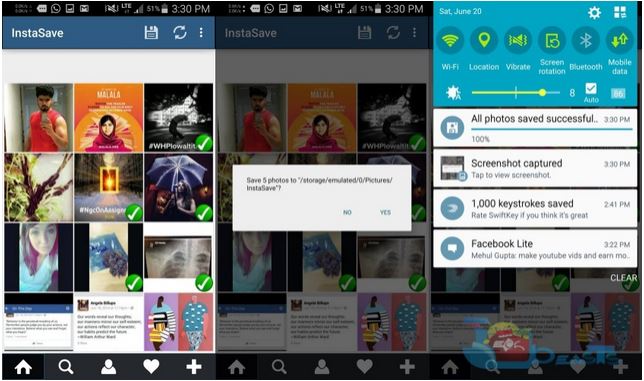
  • Firstly, download and install InstaSave on your Android smartphone.
  • After that, launch “InstaSave” from app drawer.
  • Next, login in to InstaSave using your Instagram details.
  • Now, select the photos that you wish to save. All photos and videos would be displayed from your instagram feed.
  • Tap the save button at the top.

insta2

That’s it. InstaSave would automatically save the selected photos into the internal storage memory of your android device.

How to Download Instagram Photos on iOS (iPhone or iPad)
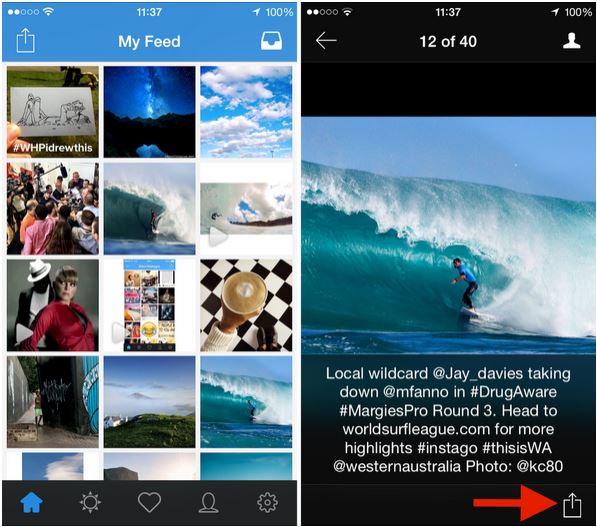
  • Firstly, download Instagrab to your device, from your App store.
  • After that, launch “Instagrab” app from app drawer.
  • Next, login in to InstaGrab using your Instagram details.
  • Now, select the photos that you wish to save. All photos and videos would be displayed from your instagram feed.
  • Tap on the Share icon at the bottom right corner of the screen, and select Save.

insta3

That’s it. The image or video would be saved to your camera rolls.

Friday, April 3, 2015

5 Best Whatsapp Alternative You Should know in 2015
Recently, there are some other trending messaging app that wants to catch up with the whatsapp messenger at fast rate, and these apps would bypass the whatsapp messenger by 2015 if care isn't taken. For now, this apps remains the best alternative to whatsapp messenger.

Below are the best whatsapp alternatives you should know in 2015.


TeleGram Messenger


Telegram messenger is a great social messaging app with pretty cool features. The telegram messenger has related features as the whatsapp messenger and more competitive. There are some other great achievements about the telegram messenger, like, it's free forever, no ads, messages can be accessed by multiple devices and many more features.


Viber Messenger


Viber is another great alternative to whatsapp messenger, but not as good as the telegram messenger because it's not mobilized on other devices apart from the android OS.
Not still withstanding, it has pretty cool features that qualifies it to be a better whatsapp alternative and also acquires the free call features which let's its users make calls within the viber messenger interface at no credit cost (as long as you have an active internet data plan).

Wechat Messenger


Wechat messenger is another ultimate alternative to whatsapp messenger with great features. Just like the whatsapp messenger, wechat messenger let's us send text and voice messengers to all our social friends that are also connected to wechat, and the messengers platform is very fast and interactive. Wechat messenger is available across all mobile device just like the whatsapp messenger and stand the chance to be one of the best whatsapp alternative in 2015.


Line Messaging App


The Line messaging app is also a pretty cool alternative to whatsapp messenger with loads of related features. The line messaging app also let's you deliver text messages, voice messages and also video calls. This app is greatly used by over 400 million audience and it's growth is very rapid. With this app, you get to send your friends quality voice messages, video calls and fast text delivery.


KiK Messenger


Kik messenger is a widely used messengers app and stands a chance to be one of the ultimate alternative to whatsapp messenger. The Kik messenger is used by over 150 million audience and it's the first smartphone messenger with a built-in browser, that is, you can chat, share and browse at the same time with the kik messenger.

Hope that the above apps mentioned serves you the best alternative to whatsapp. So whenever you get bored using the whatsapp messenger, you can simply make a swap and migrate to any of the mentioned apps above.