Tuesday, September 20, 2016

STILL HAVING ISSUES BROWSING FREE ON GLO NETWORK ??? CHECK THIS NEW SETTINGS OUT
Good day guys.,how did your day went? Hope it was great! First lemme use this medium to say a very big thanks to you guys for visiting/sharing this Blog via social media platforms, i'll be forever be grateful. Keep Visiting / Sharing and Commenting on this great Blogging platform, You Guys are the Best!!!


That said., This Article is not any different from my previous post concerning Glo Free Browsing Trick with #0.0k. This is just like an update to that, so aint going to talk much....,lets move to the Set-up!

HOW TO START BROWSING FREE ON GLO NETWORK WITH #0.0K

First, text "PAYU" to 127.

You will receive a reply that you are using data as Pay As U Go to browse.
APN SETTINGS

Name: TASEUPDATES
APN: glo3gvideo or glounlimitedzone or gloflat (anyone that works best for you)
APN Type: Tick Default & Supl OR leave them Unticked! (anyone that works best for you)
Proxy: Empty
Port: Empty
Username and password: Empty

CONFIGURE YOUR VPN

Launch any of the vpn you've downloaded and input the below setup on yours

FRONTQUERY: redirect.glo.com/glomms@
FILTER:  @10.199.212.2
ADD PORT TO NON-PORT URL: 9201
TICK REMOVE PORT 
PROXY TYPE: Real Host
PROXY SERVER: redirect.glo.com OR redirect.glo.com/glomms (anyone that works best for you)


REAL PROXY TYPE: Socks or Inject (anyone that works best for you)
REAL PROXY SERVER: his.glo.com/portal OR leave it empty
REAL PROXY PORT: 8080

Tap on OK Button!


Change Your Region to United State, Japan OR Netherlands
Make sure you don't Tick Connect through an HTTP Proxy in OPTION TAB

Now Tap START and watch your VPN Connect within Seconds!!!


This Settings is for those users still complaining that theirs is still not connecting! You can Browse and Download with this on High Speed..,No 10mb Limitions of any kind!!!

Post Your Complains if you still have any.... and post your testimony if this trick worked for you!!!


ENJOY FELLAS!!!


Sunday, September 4, 2016

GET FREE 260MB WITH GLO MOBILE WIFI IMEI IN 6 MONTHS
Hello guys, i hope you are enjoying your weekend and also the Glo 0.00 Cheat which is still rocking as of today. Well, i have another one for you. As a matter of fact, this one is a tip and fresh trick you can apply to get "free 260MB when you tweak glo mobile WiFi IMEI"


Glo is currently offering an awesome bundle offer on the Glo Mobile Wifi which costs N15,000. Glo customers that gets the device will enjoy over 3GB (260MB monthly) worth of free internet data.

The mobile wifi is a very portable device which fits in easily into your pockets and can connect up to 8 devices. This means you can share your connection with your friends, colleagues, family members and so on.

It is compatible and connects with Smartphones, Laptops, Tablets, PSP and any other wireless wifi enabled devices including your smart android television.

You Might wanna Check out How to Get 20gb with just #200 on Airtel Network

HOW TO GET FREE GLO 260MB WITH WIFI IMEI
Now here is the trick, to enjoy the free 260mb (3gb in 6 months), you need to get the glo mobile wifi imei. At the moment, it's not popular as it's just a newly introduced device and the IMEI is as scarce as good job in Nigeria. You know what I'm talking about. Lolol!!!


So how do i get the IMEI? First, get someone who just recently bought the WiFi and get the imei from him or her. Alternatively, walk into any glo outlet, pretend that you want to buy the glo mobile wifi. Then tell the seller that you want to check the features to see if it's to the standard you want. Then stylishly check and note the imei number. That's it.

Once you have gotten the IMEI Number, now it's time to tweak it on your smartphone. In case you are new to tweaking, kindly check this simple tutorial on How to tweak IMEI of MTK phones. Remember that MTK means phones that uses MediaTek processor and example of those phones are Infinix, Tecno, Innjoo, Gionee, some iTel etc. Meanwhile, if you are using non-MTK device like Samsung, HTC, LG etc, check this tutorial on How to tweak IMEI number of non MTK devices

DO I NEED TO SEND ANY NUMBER?
You don't have to send any number or code after tweaking. Once your tweaking is successful, you will get notification from glo that you have been offered the free 260mb which will continue popping in for a period of 6 months.

TIP
You can easily get more different IMEI numbers from one valid IMEI from someone that bought or has the wifi device. All you need to do is copy out the first 11 digits of the persons IMEI and randomly complete the number to 15 digits or use IMEI Analyzer to get that.

NOTE
It's more advisable to buy the device or collect from someone that bought it as the second method is not just cool at all. So am not supporting you to go and spy on the device at glo outlets.


Anyways guys, i will keep you guys updated once am with the list of valid IMEI.

It will definitely be shared here on this blog TaseUpdates.Com


Don't forget to Download Our Mobile App that Comes with alotta Freebie

Stay Tuned, Subscribe to our Blog and Share this Article!!!

Thursday, August 18, 2016

GLO FREE BROWSING RELOADED WITH NEW APN
Good Afternoon from this Part of the World. I'm so sorry for not been able to Update you guys for a while now.,it cos I'm still working on my pc view of this Blog , so Bear with Me.


Yeah.,about this article, there has been a fuzz about this new APN On Glo network this is really Blazing with Maximum Speed with no disconnection issues. So let's get on wif it

FOLLOW THE BELOW SET-UP + SCREENSHOTS AND YOU'RE GOOD TO GO!

First, text "PAYU" to 127.

You will receive a reply that you are using data as Pay As U Go to browse.

REQUIREMENTS
>>   Rooted/unrooted Android phone.
>>    Your Glo sim with 0.00 balance and no data
>>    Strong 3G network on your Glo sim.
>>   Psiphon VPN Android app

APN SETTINGS

Name: TASEUPDATES
APN: glo3gvideo
APN Type: Tick Default & Supl
Proxy: Empty
Port: Empty
Username and password: Empty


Download Psiphon Pro Lite Handler HERE.

Now Configure your vpn as follows

Launch the Psiphon vpn app you downloaded

Tick Remove Port
Proxy type: Dual Real Host
Proxy server: redirect.glo.com
Real proxy type: HTTP
Real proxy server: leave it blank
Real proxy port: 80


Now tap on Save


Goto Option => More Options and Untick all boxes there

Now go back

Select Region as United States or United Kingdom and tap on connect.


It will connect within 1 to 5mins. After it has connected.


You can start blazing and downloading like kilode!!!


Enjoy!!!

Friday, August 5, 2016

GLO FREE BROWSING WITH 0.0K IS BACK AND STABLE FOR AUGUST 2016
Hi Everyone., how are you guys doing today. As you've read the topic, you already know what this Article is talking about, so let's go there!

Last time I checked, I posted a Similar Article on how to Browse on Glo fo free with a Stable Settings but it didn't last for long cos it was still disconnecting!

But right now , I'm happy to tell you that I've gotten a More suitable and convenient settings to Stabilize your Connection. So I'm gonna be posting the Settings + screenshots to backup all the rubbish I've been saying.. Lolol!!! 😁😁😁

USER: HOW DO I MAKE MY CONNECTION STABLE WHEN BROWSING FOR FREE ???

ME: Good Question!

Goto your Settings and Configure a new Profile as shown below

NAME» Glo FBT
APN» glosecure
USERNAME» gprs
PASSWORD» gprs


Save it!

USER: AM I GOING TO BE USING ANY VPN ???

ME: Yes, you are going to be using a vpn which is called Psiphon A + pro


USER: WHERE CAN I GET THE PSIPHON A+ PRO VPN AND HOW CAN I CONFIGURE IT TO MAKE IT BROWSE FOR FREE WITH GLO NETWORK ???

ME: Very nice question!

Now the process is very Simple , all you have to do is to follow my screenshots carefully and you're done!

You can download the Psiphon A + Pro from here.

After downloading the vpn app as prescribed above.

Launch the VPN App

Tick ✅ Remove Port

PROXY SERVER TYPE» Real Host

PROXY SERVER» redirect.glo.com or http://redirect.glo.com/glomms@ (the two servers works perfectly)


REAL PROXY TYPE» Socks

REAL PROXY PORT» 80


Then Click on Save!

HINT » Now, if you are running the app for the first time, after clicking on the Save button , you'll see a first-time pop up instructions.,just click on Tunnel Whole Device

Let's Move On

Set REGION » Best Performance 


Then Connect and Start Surfing without any disconnection issues.

USER: HOPE IT WILL NOT DISCONNECT ???

ME: For all I know..,it hasn't disconnected for Me cos I've been Using it since Morning and up till now.,it hasn't disconnected!

USER: IS THERE ANY OTHER TIP YOU WANT ME TO KNOW ???

ME: Yeah., I almost forgot, there's one disadvantage tho and you might not like it...
I noticed that this New Settings takes up to 10 - 15mins to Connect, but when it does..,the rest is history!

USER: HOW LONG IS THIS GOING TO LAST ???

ME: Uuurrhhmmm,for now , I can't say. I'll  advice you to use this wisely and Enjoy it while it last!

Friday, July 29, 2016

GLO Free Browsing is Back using Tweakware v3.2
A lot of Freebies are just coming up in terms of Data Issues in all Networks in naija. If you can recall, I posted an article of Glo Free Browsing Using SyphonShield VPN App which was active for a while and laterly got blocked. And now it's Back on Tweakware VPN App which is currently Working ( that's what I'm using to post this article). So without much talk..,lets advance to the next level.

FRESH :» Do you Know Etisalat SmartPak is Back??? Click to Read More


FOLLOW THE BELOW SET-UP AND GET YOURS BLAZING

Head to your Network settings and configure yours like what you've seen in the picture below...


Next is to download The Latest Tweakware VPN App from Here

After downloading, install and Launch the App. Now follow the below Screenshots

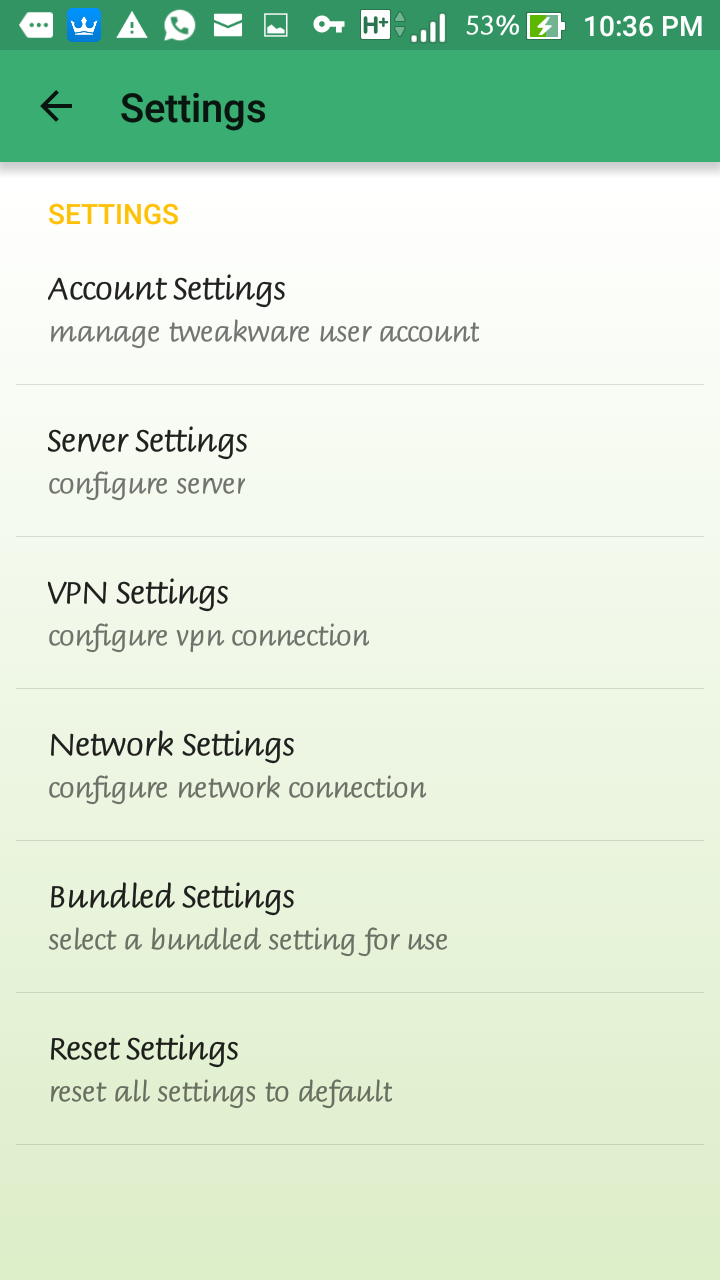
Goto »» Settings »» Bundled Settings


Next is to Tick ✅ Use Bundled Settings »» Click Select Bundled Settings

FRESH :» MTN WOW-WEEKEND GIVES YOU 17.5GB OF DATA...READ MORE


Now Select NG GLO 0.0#


Go back to the Start Page and Connect!


Bear it in mind that you'll be given 200mb for Free Server Users.,to renew the 200mb each time it finishes., simply download Android ID Changer. The way the ID Changer work is ,each time you change your Android ID by tapping on the + sign on the App, it auto generates a new ID for you.,just save it and Reconnect your Tweakware!


NOTE : I've not experienced any disconnection of any kind!

I'll Also be Posting For Psiphon VPN by Tomorrow!

Comment below if it's still giving you issues!

So Enjoy it While it last

Monday, July 25, 2016

LATEST GLO FREE BROWSING CHEAT WITH STABLE WORKING SETTINGS
Hello EveryOne, Good Morning to you all. It's another great week ahead of Us and this post is about to make it more Greater and Sweeter!


It's been a while I posted an article on Glo Network. So lemme dish this one for you all.

If you've noticed, Glo free browsing trick has been resurfacing over and over again due to the fact that they keep blocking it all the time and it's left for the tweakers to look for other loop - holes to get this particular network Surfing for free. So let's get on with it!

Download Syphon Shield, launch it and follow the Set-Up instructions

Use Default Glo Settings
APN » gloflat or glosecure

Then leave the rest of the options empty and save your APN Settings!

Goto your Handler Settings

FRONTQUERY » Redirect.glo.com

BACKQUERY » %3a@Redirect.glo.com

Tick ✅ Remove Port

PROXY TYPE » Real Host


PROXY SERVER » Redirect.glo.com

REAL PROXY TYPE » No Proxy

REAL PROXY PORT » 80


Then Save.

Choose GERMANY as Region and CONNECT.


And if you feel you still don't wanna use this FBT, you can as well Subscribe to a legit Glo data plan.

FEEL THE SPEED GUYS COS THIS IS WHAT I'M CURRENTLY USING.

and if yours ain't Still connecting.., kindly comment below, lets see how I can resolve this!!!

I hope this Last!
Enjoy Unlimited Download Guys!!!